Showing posts with label Writing. Show all posts

Monday, July 14, 2014

July Blogging Challenge - #Made4Math - Exit Jar


Today has not been quite as productive as I had hoped.  While on my morning walk, I was mulling over my to-do list and I had quite a few lofty goals to accomplish today, including my Made4Math project.  However, while sitting down to eat my breakfast, I decided to read a bit on the novel I started last night and before I knew it, it was noon and my day had gone by me!  I did get the laundry done and found a pin on pinterest that totally changed today's Made4Math idea!

End of the Day Jar
While browsing pinterest, I found this pin regarding an End of the Day Jar.  The idea is to have a set of prompts ready to go that you can use as a question at the end of the day.  Since one of my goals this year is to incorporate more writing, I thought this sounded like a great Exit Ticket idea!

I ended up going back to an #EduRead post a few months ago where I had posted a lot of Exit Ticket prompts that I had found online and created a set of cards.  Ideally, I would have them all printed out for you, but yesterday our print server died so no printing for me! :(

Here's a sample of the cards:
Want the PDF file?  Click to download it!

Now that I have a set of 18 prompts, I can easy pull one out of the "Jar" and put it under the document camera or read it aloud to the students.  One thing that I've learned after many years, it has to be easy to use or I won't do it! :)

P.S.  I'll try to update this once I have a printed, pretty picture to share :)

What did YOU make this week?  Visit the #Made4Math blog to see the other submissions!

July Challenge
I am on a personal challenge to blog every day in July, just to see if I can do it. I would love to have you join me! If you are worried that you've missed a few days, please don't stress.. just jump on in! Maybe a month is too much, that's okay, try it for a week, or every other day, or once a week.. whatever works for you!

Don't forget to visit the other July bloggers and show them some love!
The bloggers (so far)
Robin at Flip! Learn! Share
Bridget at Reflections in the Plane
Teresa at GeometryWiz
Sherrie at Middle School Math Rules!
Brooke at Sined, Sealed, Calculated
John at Functions are Fun
Jedidiah at Math Butler
Pam at the radical rational
Roxy at Rockstar Math Teacher
Paul at TeacherPaulP
Tina at Palmer's Ponderings
Cindy at School Stuff
Robyn at Making Math Visible

Add your blog in the comments if you would like to join in! :)
#July2014Challenge

Sunday, June 29, 2014

Summarizing and Thinking Time

One of the books on my to-be-read list is Summarization in Any Subject by Rick Wormeli. This is a book that I've been eyeing for at least a year, so I checked it out from my school's Professional Library in May. Today, hubby and I went to take my dad out for dinner, which gave me a couple of hours roundtrip to skim the book and I'm glad I did! The book claims to have 50 strategies for any subject and while I wasn't equally impressed with all of the strategies, I did find several that I really liked.

One of the things that I have read about a lot lately is the idea of 10:2, which is the concept of every 10 minutes of the lesson/lecture, give students 2 minutes of processing time. I have known of this concept for years, but at my AVID workshop, it hit me again. I'm definitely one that needs my processing time and as a learner, I really appreciate when that time is built into the lesson, but I don't do enough of it as a teacher. I hear people talking about writing in math and when I was in high school, I would have agreed with the nay-sayers, but as a learner now, I see the benefit of writing. When I write, whether on this blog or in the mini-notebook I carry with me, it allows me an avenue to get the random thoughts out of my head and onto paper so that I can organize them into coherent ideas. If I keep them bottled up in my head, I get overwhelmed and lose focus because of all of the jumble of thoughts running and jumping and playing in my head. My notebook looks like a jumbled mess too, but once an idea is down on paper, I can process it and determine the feasibility of the idea.

I still need to go back and read the book in more detail, but here are the notes I jotted down while skimming in the car today:

  • 3-2-1 - This one is a pretty standard summary strategy and I've used it as an exit ticket, but I am including it because I don't think I use it to its full potential. In fact, the other day at Barnes and Noble, I saw one in a book that I was skimming that was 5-4-3-2-1 and it was an end of year reflection/teacher evaluation.

  • Carousel Brainstorming - I have used this strategy (and the similar Gallery Walk) before but not recently. Funny thing is that I even pinned a few ideas related to this strategy last night/this morning while browsing pinterest for AVID ideas. One of the reasons I haven't used it as much over the past few years is due to the cost of chart paper, which lead to me tweeting out a request for cheap chart paper ideas and Beth (@algebrasfriend) replied about the coloring paper at IKEA which is $5 for 100 feet of 18" wide paper. That made me look at Sam's, which apparently has 1000 feet of butcher paper for $18, so guess where I'm going shopping tomorrow? :) Custom sized posters... charts... banners... OH MY! :)

  • Inner Outer Circle - Earlier today, @kklaster had tweeted out about Quiz, Quiz, Trade, which is a quick review strategy that I have used before. When I read the section on Inner Outer Circle, it reminded me of a time that I had used it with Algebra 2 and log/exp form. I made flashcards with log form on one side and exp form on the other and had the kids get into concentric circles. They quizzed each other on switching between the two forms, then the circles rotated to a new partner. This past school year, I used QQT for some other ideas but had forgotten the circles part and mass chaos erupted as kids struggled to partner up or stayed with the same person instead of mixing around like they were supposed to. After reading this strategy and thinking/reflecting, I definitely think I will use QQT and Inner/Outer together as it keeps the kids with a structure on partnering and less chaos in general. Now to start working on my QQT cards! (Hoping I can get a set together for #Made4Math tomorrow!)

  • Learning Logs - This is another strategy that we use extensively in AVID, but I haven't really used it much in my math classes. I want to spend some time developing good Learning Log prompts for AP Stat...

  • Brain Dump - The book called this Partners A and B, but to me, it was purely a 'brain dump'. This is another strategy I have used in AVID, but not as much in my math classes. This would be a great strategy to use with the 10:2 concept. After about 10-15 minutes of lesson/lecture, let the kids have a brain dump. Often my students are seated in pairs, so designate one of them as person 1 and the other as person 2. Set a timer on your phone for 1 minute and person 1 says everything they can recall from the lesson so far. At the bell, person 2 does the same thing, but tries not to repeat anything that was on person 1's list. When the buzzer goes off again, give 1-2 minutes of writing time for the students to process/summarize the partner talk.

  • Give One Get One - This is another strategy I've used before, but I like how the book used a 3x3 matrix to collect the responses. In the past, I've done it with post-it notes and the students actually exchanged post-its, but the matrix has so many possibilities for organizing thought or even sequencing. Definitely a modification I plan to steal!

  • Summary Ball - When I first read this strategy, I thought it was going in the direction of the "write a bunch of questions on a beach ball and toss it around", which is a fun idea and one that I have pinned several times from various blog posts. However, this one had a fun twist of just tossing around the ball and saying something you had learned that day/unit, but if you couldn't think of anything, you had to sit down. I think it would be fun to see how long this could last and I am curious to try it on a quiz/test review day!

  • The book has 50 total strategies, but these are just a few of the ones that I really liked or have used before. I highly recommend the book and plan to purchase it for my personal library!

    Now back to the 10:2 idea. While skimming the book, I tweeted out the following:


    I really want to develop a go-to list of ideas that are really quick ideas similar to the ones listed above that I can use as a mini-processing activity. If you have a favorite one, please let me know!
  • Saturday, April 19, 2014

    In case you haven't noticed...

    ... I've been a bit absent on the blog-o-sphere. I know I don't have a ton of readership, but I feel horrible for not blogging and every day that goes by makes it easier to put it off for just one more day. :(

    It's been a rough semester and there are 6 weeks left to go. I am having an awesome year in general and I love my classes and students, but 3 preps plus the other supervisory positions that I have are all adding up to too much on my plate. I am ready for this summer, even though it will be just as busy with the AP Reading, AVID training, and TMC14.

    But enough whining... I want to talk ramble about #EduRead! :)

    This past Wednesday, we met on twitter for a trial run of #EduRead, which is a weekly twitter chat where we read an educational article and discuss it. You can see the transcript and article on the #EduRead blog.

    The article was about writing in math class and I really enjoyed it. I am very intimidated by the idea of writing, but I would definitely like to do more. On my drive home this week, I spent some time thinking about how I could incorporate writing in my classroom. I know I really want to do a better job with Exit Tickets next year, so I'm really looking forward to the #EduRead discussion on Exit Tickets on 4/30, but I know I won't be able to read those on a daily basis. I do think that a 3-2-1 on Fridays might be doable, and if it's a quiz/test day, they can do the 3-2-1 on the test/quiz paper. Maybe I need to come up with a 'schedule' for each day of the week so I don't have to do too much thinking about what to do each day.

    One of the other things mentioned in the article was a portfolio. Several years ago, I created a "How To" notebook for my AP Stat classes, but I never could make it work the way I wanted to. I think it might be useful for my AP Students to have some sort of portfolio, but I'm at a loss of how to make it work. One of the former AP Calc teachers at my school using to do a "How To" type notebook that actually inspired mine and she loved it for calculus. She gave the students a list of topics, then gave them a prompt to fully answer for each topic. When I tried it, I was very disappointed in the student output, which led to me giving them something to copy down instead of doing it themselves, and I know that's not a good solution either. Of course, now that I'm thinking about it, it reminds me of earlier this week when students were working on some review material. I was so impressed with how they were using their class notebook to go back and look for the information from this fall, so maybe their portfolio is actually their INB? *Mind Blown* If that's the case, maybe I need to incorporate some writing assignments into the INB like the 'clock questions' and the 'parent review page' from some of the AVID training

    So... Many... Thoughts...

    :)

    Thursday, June 21, 2012

    Cornell Notes in Math Class

    A few weeks ago, @lmhenry9 sent out a tweet asking about Cornell Notes in math class. This morning, @aanthonya sent out another request. Since Cornell Notes are a staple in the AVID classroom, I thought I would post a "how to" on using Cornell Notes in a math classroom.

    Rationale
    If you do a google search on Cornell Notes, you will find pages and pages about the history of Cornell notes, why you should use them, what the benefit is, etc. However, what is harder to find is the down and dirty, how do I do this, what's so special about C-Notes, etc. Honestly, when I first heard of them at the start of my AVID journey, they scared me. I remember sitting in my first AVID summer insitute stressed because I had NO CLUE what they were talking about! Unfortunately, I felt that stress for quite a while because it took time for me to understand that C-Notes weren't as scary or weird as they seemed. They are really just the same notes I had taken for ages in a slightly different format.

    Setting up the Page
    If you've heard of C-Notes, you've probably realized that there's some formatting that needs to be done. There are C-Note generators online or you might create your own C-Note blackline master (see the one we use in our AVID classes here). However, both of those require you to run off copies, which may not be feasible, depending on your allowed copy count. :)

    Enter in the Cornell Notes Bookmark. This is an idea that I got at the AVID training several years ago and I instantly loved the idea because I could have put contact info, important formulas, etc on this bookmark and kids could also use it to draw a straight line down their notebook paper to create their 2-column format. Of course, cutting out 100 of these bookmarks isn't the most fun way to spend the week before school starts in August, so I definitely suggest finding a great TV show to help keep your mind occupied :)

    So, now that all the bookmarks are printed on cardstock, cut out and 3-hole punched, kids are ready to start making their notes. Lay the bookmark on top of your notebook paper and use the edge as a guide to create your left/right columns:
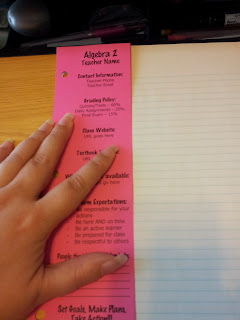


    C-Notes have 4 main parts. The heading, which is where the name/date/hour/topic information goes, the left and right sides, and the summary area. Some of the newer versions of C-Notes also have an area for the Essential Question (inspired by UbD). Here's the general layout of the page:
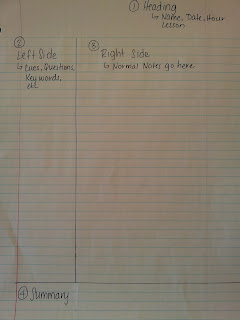


    Let's take some notes!!
    So now that the format of our notes is all done, it's time to take some notes. You'll notice above that the right side of the page is a bit wider. This is the area for the bulk of the notes. The right side is the same type of notes that you've always taken - the fast and furious scribbling of all of the information that you could get down at once. (This is obviously not a student paper - I did it this morning to show you an example)

    Right side filled in:
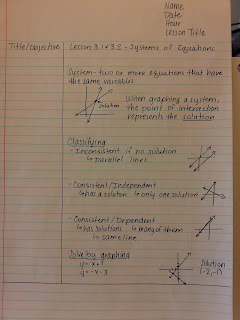

    You'll notice that the above picture really looks like a traditional page of notes. The beauty of Cornell really is in the left side. After the notes are taken in class, students are supposed to review the notes within 24 hours and fill in the left side. They are supposed to read over what they wrote on the right side and put short reminders and cues to themselves. You'll see below where I went back and reviewed my notes to fill in the left side.

    Left side filled in:
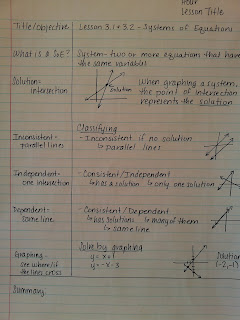

    Now if you noticed above, I said "students are supposed to" twice... that means, in my experience this rarely happens :) Typically what happens in my experience is that they fill in the left side as they go with topic changes, subtitles, etc. The beauty of the left side, whether done at the same time or 24 hours later, is that the kids don't need to read ALL of the right side scribbles in order to get the gist of the lesson. They can scan through the left side cue words to refresh their memory or to find something quickly. (This has been a brillant addition to my note-taking during PD as well :) Love being able to quickly scan the left side!)

    The final part of the C-Notes is the part my students hate the most. :) The summary section is admittedly the toughest part for students and teachers to do. Again, students are supposed to revisit their notes 24 hours later or so (comes back to that whole "forgetting curve") and write a brief summary of the notes. My students complaint was a valid one... they summarized what the teacher said/wrote on the right side. Then they summarized that again to write their cue/questions on the left side, now they were expected to summarize again at the bottom and they were just summarized out! But kicking and screaming, I recognize that being able to summarize was an essential skill for academic success. To combat some of this, I would sometimes let them do a "tweet" (limiting their response to 140 characters) or a "6 word memoir" of the lesson, which really shows off how much you can say in just a few words.

    Summary filled in:
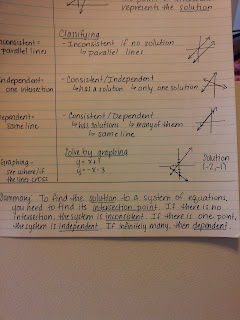

    I've taken notes... now what??
    I've already shared above my love of the left side. But there are other benefits to C-Notes as well. You can use the left side to predict test questions that the teacher might ask or commonly, use the C-Note format as a study guide. For many of my students, they would work their test review in C-Note format, with the problem on the left side and the work/solution on the right side. Then fold their paper on the line and you have an instant "flashcard" like study system.

    Now in case you are thinking - well, that's all fine and good, but I'll never use something like that!, let me leave you with a real-life page of notes that I took at a workshop. You'll notice that I'm just as bad as my kids in the summary section, but look at the benefit of that left side! MUCH easier to scan down the left side to see what I want than to read all that stuff on the right side! :)
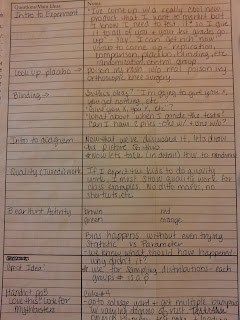


    Good luck on your C-Note journey!


    Wednesday, December 28, 2011

    Exit Slips

    For several years, I've wanted to do exit slips, but I just never could get it organized to my liking. I understand the benefit of them and can see them being an awesome thing in my classroom.

    Enter in some discussions with my bestie, @approx_normal... she does her warmups on index cards and then hands them back for the students do to the exit question on the back and put it in a box by the door. But, like @approx_normal, I also suck at closures and often run out of time....

    So today, while she and I are discussing some ideas for the spring semester, I get a brainstorm.... What if I made a poster of generic exit-questions and posted it in my classroom? For example...

    1. Summarize the important points of today's lesson

    2. Write 3 things you learned, 2 things you are fuzzy on, and 1 question you still have.

    3. Etc

    Then, at the end of the hour, I could just direct student's attention to the poster and tell them to write their response to question number ___ and put their index card in the box as they leave the room.

    I need more exit ticket prompts though.... Ideas? :)